One logbook. Every stage of diving.

The dive app you won't outgrow.

Super Dive Log & Planner combines a world-class dive log with a planner that learns over time from your logged dives—approachable from day one, and ready for technical and DIR diving when you are.

Planner intelligence 247 dives learned
A plan built around you
Estimates refine as your logbook grows
Learned SAC15.8 L/min
Est. weight7.2 kg
ThermalComfortable
Recreational Technical DIR
DESCENTBOTTOMASCENT

Start simple. Go as far as your diving takes you.

Logging a recreational shore dive should feel effortless. Planning a multi-gas technical dive should feel rigorous. Super Dive Log & Planner gives each the right workflow without forcing you to switch apps as your diving career advances.

  1. 01
    Recreational

    Fast logging and clear, approachable planning for everyday diving.

  2. 02
    Technical

    Multi-gas Bühlmann planning with decompression schedules and gas requirements.

  3. 03
    DIR

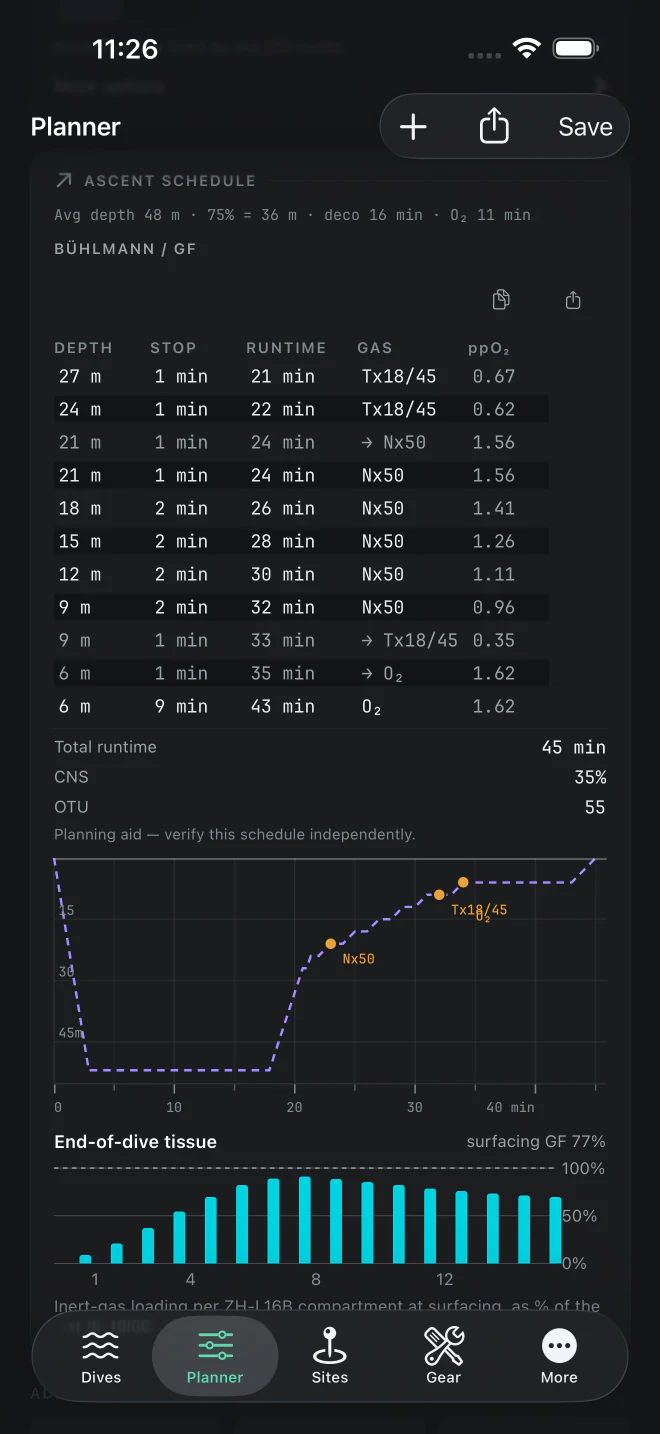
    Standard gases, minimum gas, ascent strategy, Decoplanner emulation, and established DIR procedures built into the workflow.

The whole dive, from first idea to lasting record.

Move from a quick look through your history to a detailed technical plan without leaving the same logbook. Every screen is native to iPhone, iPad, and Mac.

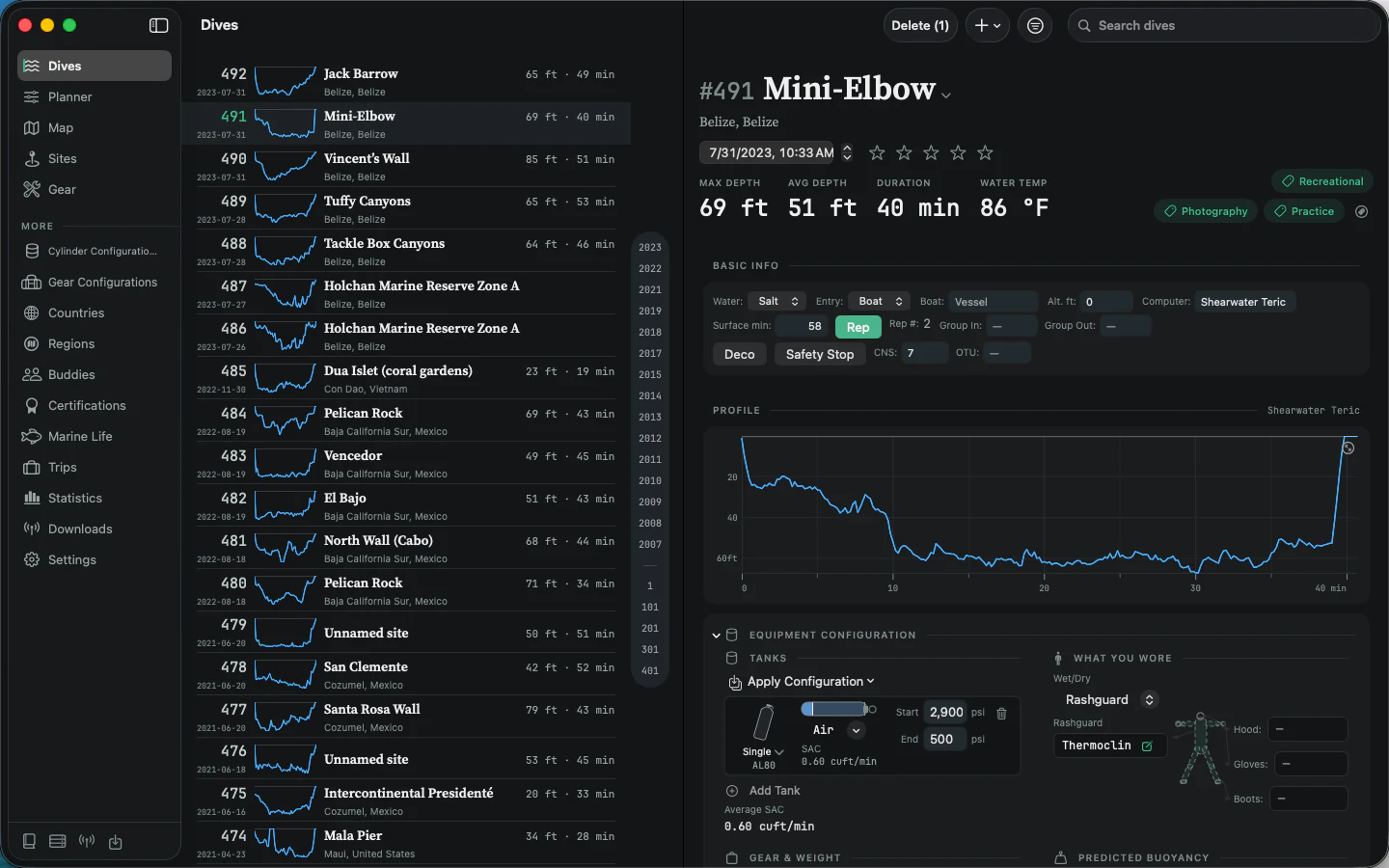
A complete dive record in the Mac app, showing the dive list, profile, computer data, tanks, exposure protection, gear, and predicted buoyancy
MacThe actual dive log, with nothing flattened awayOpen a dive to its full profile, computer data, tanks, exposure protection, equipment, gas use, and the details that make the record useful.
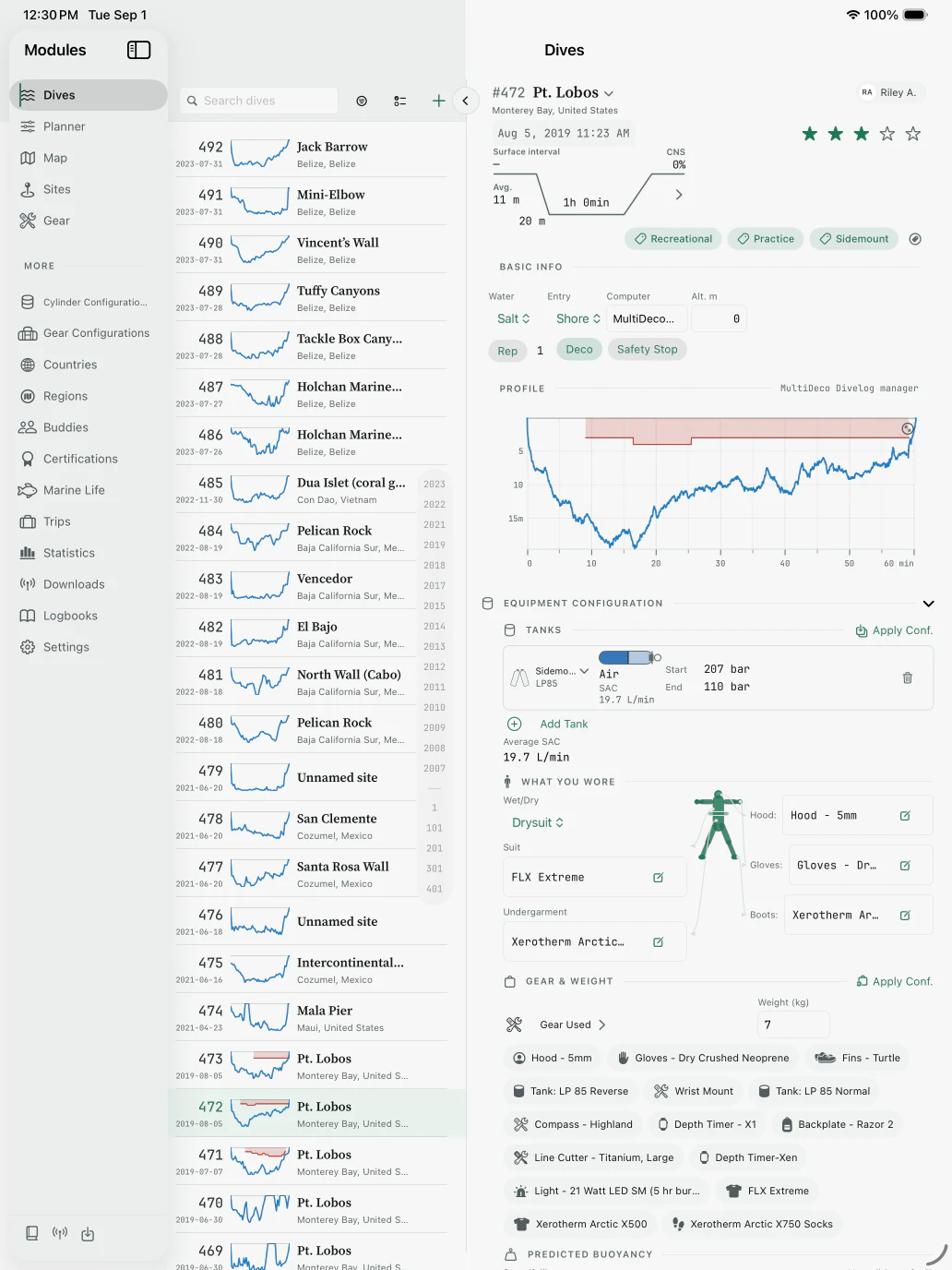
A complete dive record on iPad, with a searchable dive list beside profile, tank, exposure protection, gear, and buoyancy details
iPadYour history and the full dive side by sideMove through the logbook while the complete selected record stays in view.
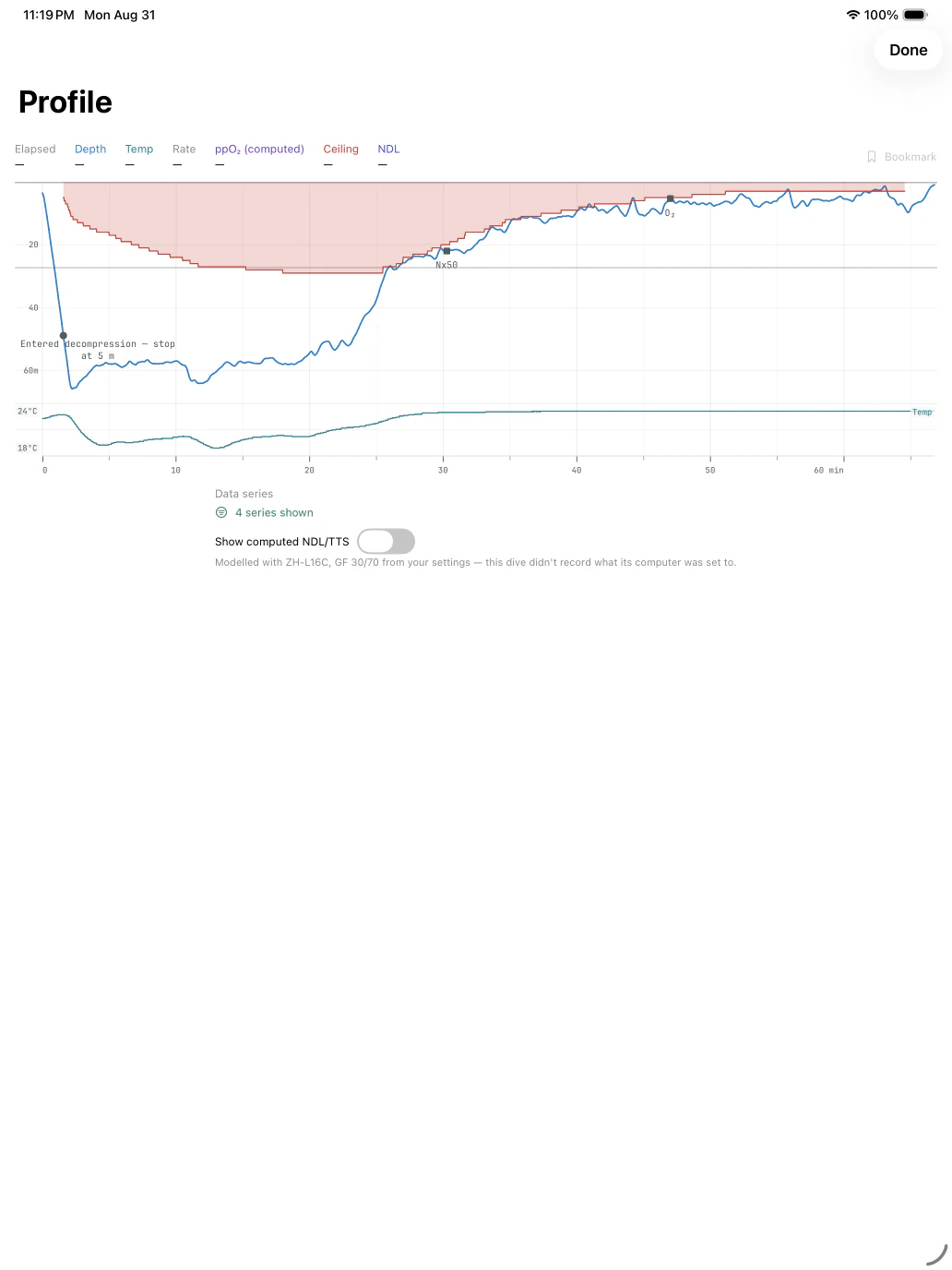
Detailed dive profile on iPad showing depth, decompression ceiling, gas switches, temperature, and computed NDL and TTS controls
iPadEvery sample your computer recordedInspect depth, temperature, ceiling, gas switches, and computed decompression data.
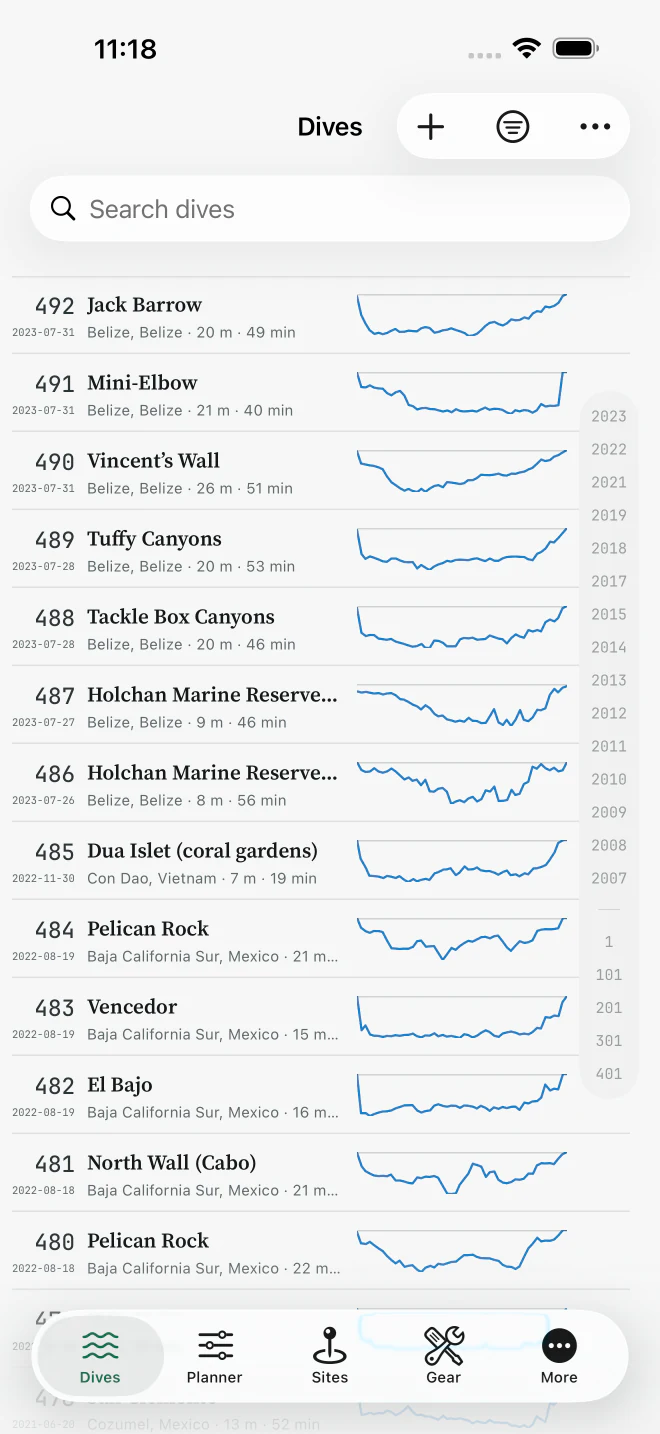
Dive list on iPhone with dates, locations, depths, durations, and profile charts
iPhoneYour whole diving life, in one logSearch years of dives and scan every profile at a glance.
DIR decompression schedule on iPhone with gas switches, ascent profile, and tissue loading
iPhoneDIR schedules tested against DecoplannerSee every stop, switch, runtime, and tissue compartment.
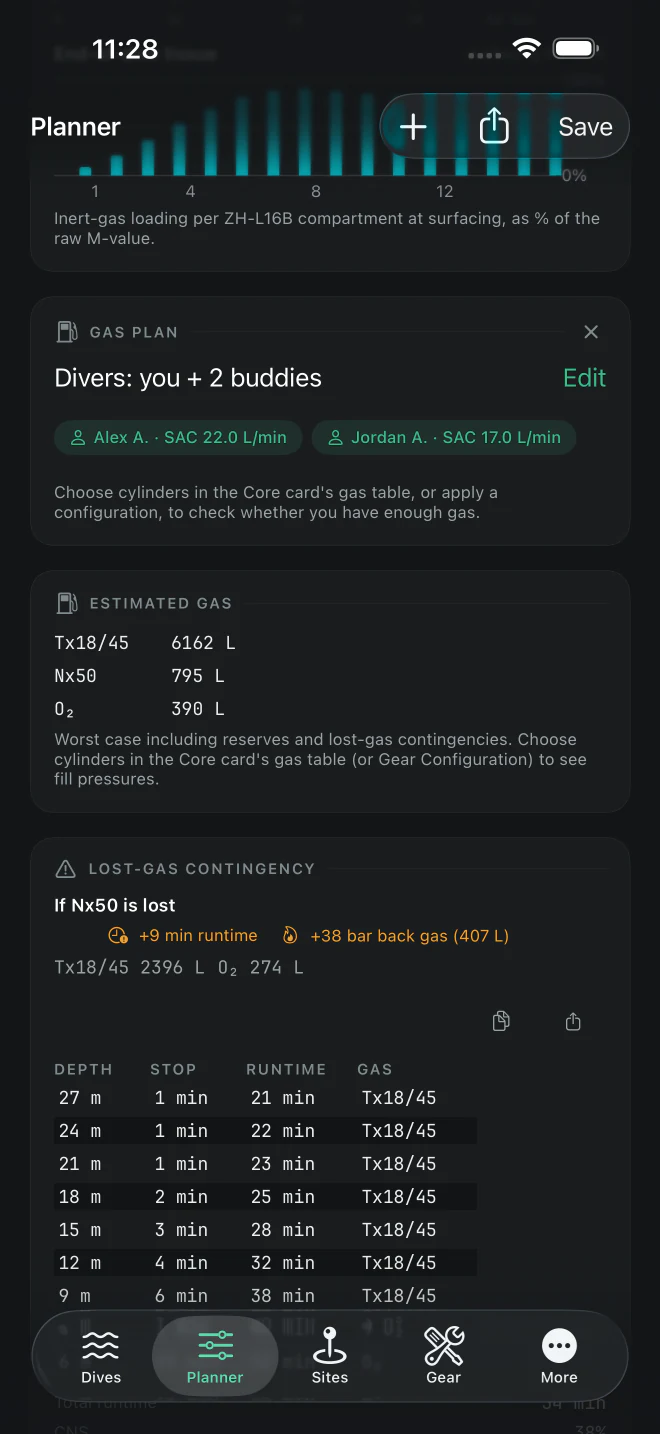
Technical gas plan on iPhone with team SAC rates, gas requirements, and a lost-gas contingency
iPhoneTeam gas, built around real SACPrice reserves and lost-gas contingencies into the plan.
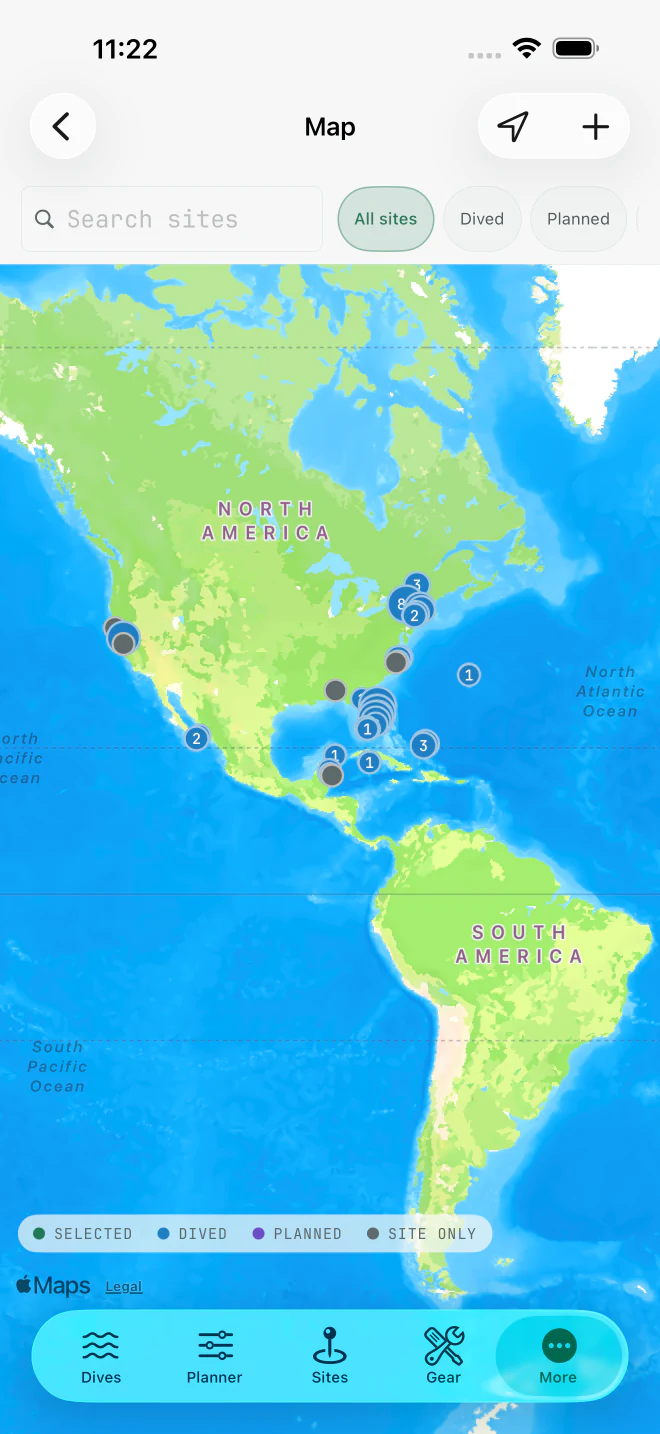
Map on iPhone showing dived, planned, and saved dive sites across the Americas
iPhoneEverywhere you have been—and will goSee dived, planned, and saved sites together on the map.
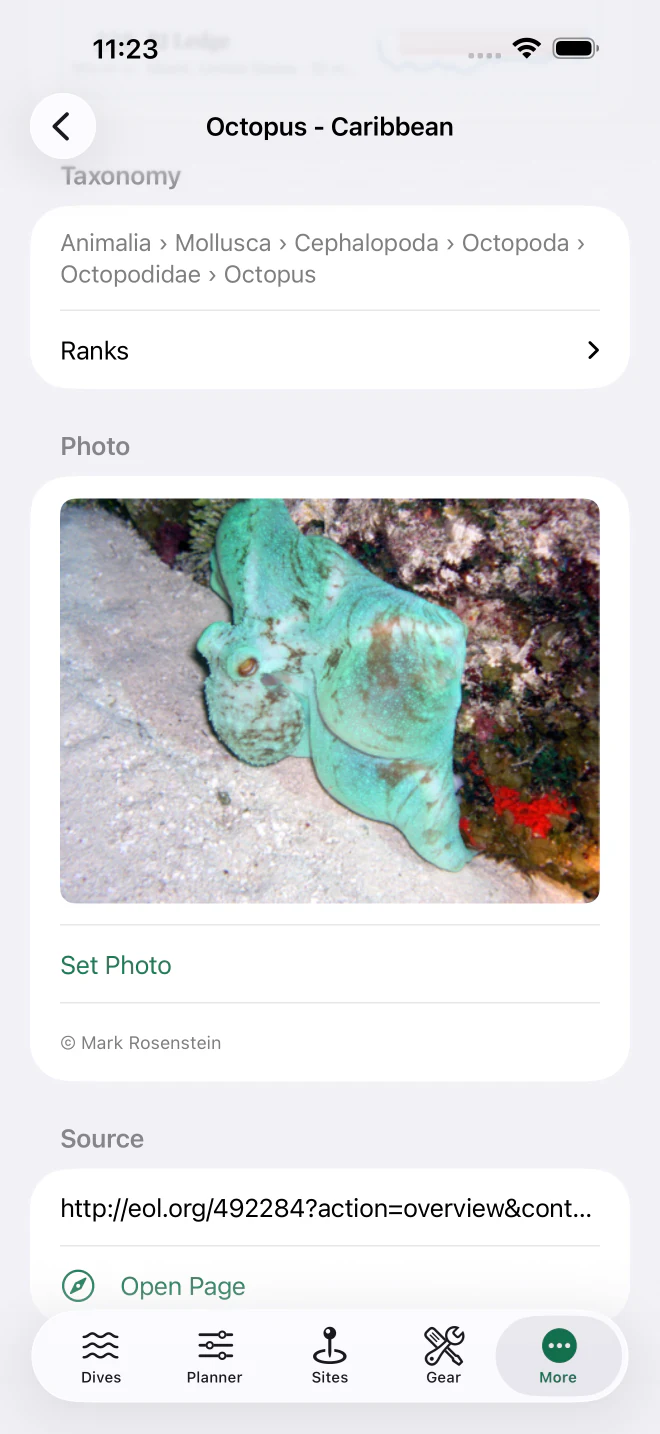
Marine life record on iPhone showing taxonomy and a Caribbean octopus photo
iPhoneName what you sawConnect species, sightings, photos, sites, and dives.
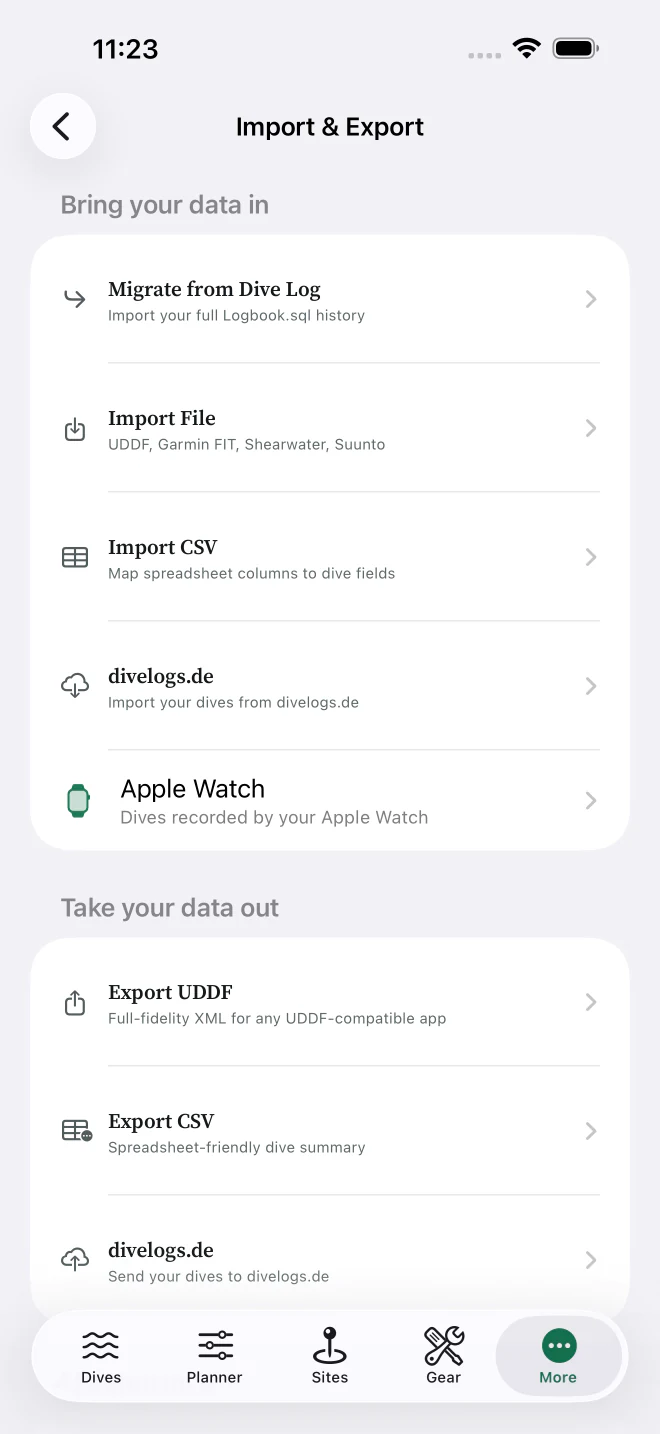
Import and export screen on iPhone listing Dive Log, UDDF, Garmin FIT, Shearwater, Suunto, CSV, and Apple Watch
iPhoneBring your history. Take your data out.Import broadly and export in standard, portable formats.

Your diving history becomes a tool for the dives ahead.

From the first entry in your logbook to a multi-gas expedition plan, the details stay connected. What you record after one dive makes the next one easier to understand and better prepared.

01 / LOG

A complete record, not just a depth and a time

Keep the full story of every dive in a world-class dive log, with the detail to remain useful years later.

  • Profiles, tanks, gases, and gas switches
  • Sites, buddies, trips, and operators
  • Conditions, ratings, notes, and tags
  • Photos attached to dives, sites, and gear
  • Equipment history and service reminders
  • Statistics and insights across your logbook
02 / LEARN

A planner that learns

Your own dives improve gas planning, buoyancy estimation, and thermal planning for the dives ahead.

  • Gas planning based on your measured SAC
  • Buoyancy and weighting predictions from your gear
  • Thermal guidance learned from what kept you warm
  • Repetitive tissue loading from recent dives and plans
03 / PLAN

Serious planning at every level

Start with a clear recreational plan, then go as deep as the dive requires.

  • Bühlmann decompression with gradient factors
  • Recreational, Technical, and DIR modes
  • Nitrox, trimix, SCR, and CCR support
  • Lost-gas and deeper-or-longer contingencies
  • Gas requirements for individual divers and teams
  • Altitude, water type, and salinity accounted for
04 / CONDITIONS

Know what the water will be doing

Bring the environment into the plan, then preserve the conditions that actually happened with the dive.

  • Weather forecasts for the dive site
  • NOAA tides and worldwide tide predictions
  • Tide curves for planning around slack water
  • Conditions history on logged dives
05 / EXPLORE

Remember where—and what—you found

Build a geographic and natural-history record alongside the dive itself.

  • Thousands of dive sites, plus your own
  • Maps, time zones, and site condition history
  • Marine life sightings tied to dives and places
  • Species lookups from iNaturalist, WoRMS, and EOL
06 / CONNECT

Your computer, your history, your data

Start with the records you already have, add new dives straight from your computer, match each recording to the dive you already wrote up, and keep a portable copy whenever you want one.

  • Bluetooth downloads from all major dive-computer brands
  • Apple Watch Ultra dives through Apple Health
  • Recordings matched to the dives you logged by hand, with a preview before anything merges
  • Dive Log, Diving Log, and Subsurface imports
  • Shearwater Cloud, Suunto DM3/DM4/DM5, and Garmin FIT imports
  • divelogs.de, JDiveLog, Seac Sync, Seabear, Poseidon MkVI, Divesoft, and OSTC files
  • Full-fidelity UDDF and CSV export, plus DAN DL7
07 / CONVERSE

Work with an AI assistant

The built-in MCP server on Mac lets Claude, ChatGPT, or another MCP client work with your logbook in conversation.

  • Search and summarize your dives
  • Update logbook records
  • Explore patterns and plan future dives
08 / EVERYWHERE

One logbook across your devices

Native apps keep your diving record close without locking it into a proprietary dead end.

  • iPhone, iPad, and a real native Mac app
  • iCloud sync across your devices
  • Available in 28 languages
  • Local-first storage and standard exports
One diving career. One connected record.

Designed for iPhone and iPad, with a real native Mac app. Super Dive Log & Planner is available now on the App Store.

Read the privacy policy